Test Prep Insight is reader-supported. When you buy through links on our site, we may earn an affiliate commission. Learn more
Best Language Learning Apps For Beginners
Our expert breakdown of the top language learning apps for beginners, tested and reviewed.
Starting a new language from scratch can feel overwhelming. Where do you even begin? Should you memorize verb conjugations or jump straight into conversations? After testing language programs extensively, I can tell you this: the best language learning app for beginners is the one that actually keeps you coming back every day. I’ve spent months testing every major language app for beginners on the market, so this review covers hands-on use, progress tracking and figuring out what works when you’re starting from zero. In this guide, I’ll break down which apps are genuinely effective and which ones waste your time with gimmicks.
Video Review: Best Language Learning Apps for Beginners
In the video above, Lara from the Test Prep Insight team shares our picks for the best language learning apps for beginners. She covers ease of use, lesson style, speaking practice, pricing, and who each beginner language app suits best. This supports queries like ‘best language learning apps for beginners’, ‘beginner language apps’, and ‘learn a language from scratch’. For more detail, be sure to continue reading our full written guide below.
What Makes a Great Language Learning App for Beginners?
Before we dive into specific apps, let me tell you what I actually look for when I’m testing language learning apps for beginners. Not all apps are created equal, and what works for intermediate learners can completely overwhelm someone just starting out.
Ease of use is huge for me. When you’re brand new to a language, the last thing you need is a complicated interface. The best beginner apps like Babbel get you learning within 30 seconds of opening them. The easiest language learning app needs to work around your actual life with lessons that fit into 10-15 minute chunks.
Structured lesson plans matter more than most people realize. One thing I always look for is a clear path that builds logically. Apps that throw you in randomly leave you learning “philosophy” before you know how to say “hello.”
Speech recognition practice is non-negotiable in my book. You can’t learn to speak without actually speaking. I know it feels awkward talking to your phone, but I’ve found apps with solid voice feedback, like Pimsleur, are game-changers. You need to know if you’re pronouncing things correctly before bad habits cement themselves.
Apps for busy beginners matter more than people realize. If you’re short on time, choose a program built for quick sessions that fit into your actual schedule. Some apps let you learn hands-free during commutes, others offer 10-minute lessons perfect for lunch breaks, and the best ones work offline on planes or trains. Look for features like driving modes, downloadable lessons, and flexible session lengths.
Free vs paid is where I get real with people. Yes, there are free language learning apps for beginners. But here’s what I’ve learned: the free versions hit a wall within a week. If you’re serious about learning alanguage, expect to pay something. The good news? Quality apps cost $8-20 per month. Not free, but affordable if you’re serious about learning.
Learning a new language can take time
Breaking Down the Best Beginner Apps
Alright, let’s get into the actual apps. I’ve tested these extensively, and I’m going to tell you exactly what I found, what works, what doesn’t, and who each one is actually good for.
Editor’s Choice: Babbel
I’m going to be straight with you: Babbel is my top pick for beginners starting from scratch. After testing it against everything else on the market, this is where I’d send my own family members if they wanted to learn a new language.
What makes Babbel work so well? The lessons are practical from day one. I wasn’t learning random vocabulary. Instead, I was building real conversations I’d actually use when traveling or living abroad. The structure made sense to me, taking me from absolute basics to conversational skills in a logical progression that never felt overwhelming.
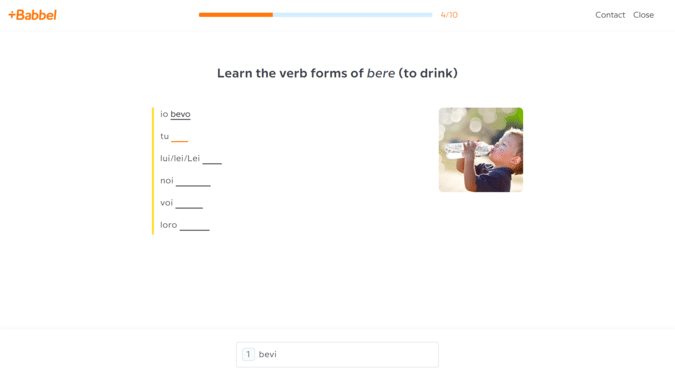
The lessons themselves are short and engaging, usually 10-15 minutes. Each lesson includes a dozen quick drills: flashcards, fill-in-the-blanks, matching pairs, and listen-and-repeat exercises, which kept things interesting and never felt overwhelming.
One thing I really appreciated: if you actually want to understand grammar, Babbel delivers. They weave it into lessons seamlessly with brief explanations right when you need them. I learned the rules as I used them, which felt way more effective than memorizing conjugation tables. Some apps avoid grammar entirely or expect you to figure it out intuitively, but Babbel strikes a nice balance for beginners who want that structure.
The variety helps too. Beyond core lessons, there are videos, podcasts, and stories to mix things up instead of just doing the same drills over and over.
Babbel’s speech recognition impressed me. Not perfect, but definitely better than most competitors I’ve tried. I got meaningful pronunciation feedback that actually helped me improve. And the review system is smart, bringing back material I struggled with more frequently until it stuck.
Babbel’s Speech Recognition Feature
The downside? Babbel’s speaking practice is limited. You’re mostly repeating words and phrases, not working through extended conversations. If speaking practice is your top priority as a beginner, Pimsleur does this better with their conversation-based lessons.
One thing I really appreciated: Babbel doesn’t stay at the beginner level. The content progresses steadily toward intermediate topics, so I felt like I was genuinely advancing my skills.
Babbel Drills Evolve As You Get Better
Pricing: Babbel’sretail price is around $18 per month, but after promotions and sales, expect to pay around $8-15 per month, depending on subscription length. The 12-month plan typically costs about $8/month. They also offer a 20-day money-back guarantee and a lifetime plan.
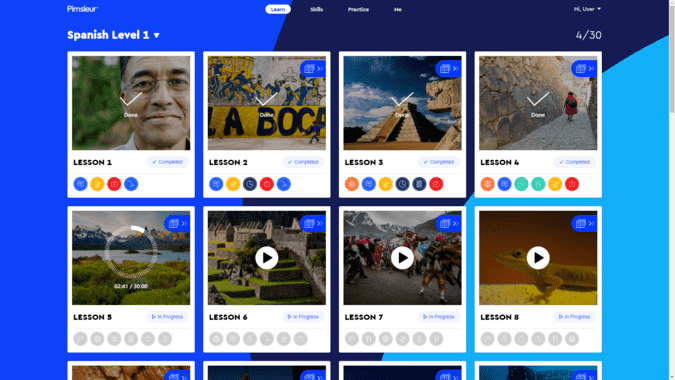
If you’re an audio learner like I am, or if you spend a lot of time commuting, Pimsleur is hands-down the best app for developing speaking skills. This program is basically the opposite of Babbel. It’s almost entirely audio-based, with 30-minute lessons you complete by listening and responding.
Here’s how it works: a moderator guides you through conversations in your target language, asking you questions and having you participate. You’re not just passively listening. I found myself actively recalling vocabulary and constructing sentences under pressure, which is exactly how real conversations work.
The spaced repetition system Pimsleur uses is incredibly effective. I’d hear a word introduced, then be asked to recall it seconds later. Then minutes later. Then days later. This interval-based approach really hammered vocabulary into my long-term memory in a way that stuck.
The huge advantage for me as a busy person? I could do Pimsleur lessons while doing choresor exercising. The app even has a special driving mode. I wasn’t tied to staring at my screen, which made it so much easier to fit language learning into my packed schedule. I knocked out lessons during my commute that I never would have completed with another program.
Pimsleur Spanish: Doing It on-the-go
The downside is that Pimsleur is light on reading and writing practice. If you’re a visual learner who needs to see words to remember them, this might not be your best fit. But for developing conversational skills and pronunciation, especially as a complete beginner, I found Pimsleur effective.
Pricing: Around $15 to $20 per month for one language. They also offer an All Access plan for just $1 more, which includes 50+ languages.
Best Entertainment Supplement: Lingopie
Now for something completely different.Lingopie takes a unique approach by using real TV shows and movies to teach languages. Think Netflix, but designed for language learners. I have to admit, this was the most fun I’ve had with language learning.
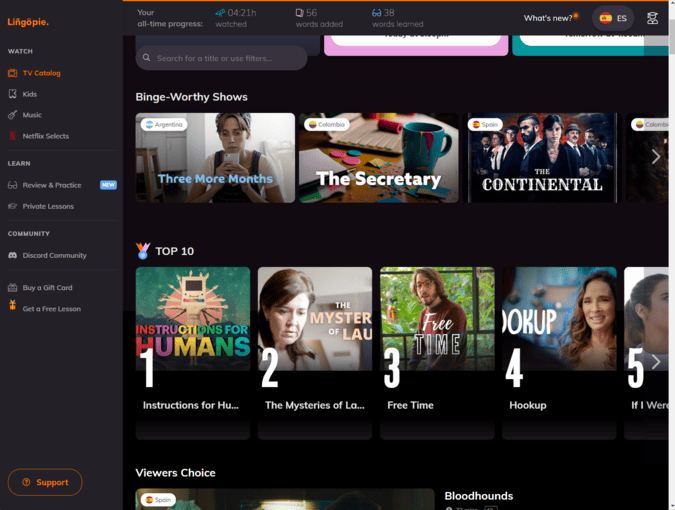
After signing up and selecting my target language, I was brought to a dashboard that looks exactly like a streaming service. There are shows and movies organized by category, just like Netflix. I picked something that interested me and started watching, but with learning tools built in.
The cool features I loved: I could toggle between English and target language subtitles (or show both), loop scenes until I understood them, control playback speed, and pause to repeat what characters said with speech recognition grading my pronunciation.
What I really liked is the grammar coach. I could click any word in the subtitles and get instant definitions and grammatical explanations. The app automatically created flashcards from words I looked up, using the actual video clips for context. This helped my retention a lot.
Lingopies Platform Looks Similar to Netflix
Here’s my honest take: Lingopie has no clear curriculum or structured learning path. You’re basically left on your own to figure things out by watching shows. There’s no progression from lesson 1 to lesson 50 guiding you systematically. You just pick shows and go.
For complete beginners with zero foundation, this is overwhelming. Even “beginner” level shows moved quickly with complex language I wasn’t ready for. Here’s what I’d suggest: use Lingopie alongside a structured app like Babbel from the start. Babbel provides the foundation and grammar while Lingopie adds entertaining practice through authentic native content. The combo works because the structured base makes shows less overwhelming.
Pricing: Around $14 per month MSRP for either a 3-month or 12-month plan, but you can usually find both marked down to about $6 per month on sale. That makes it one of the most affordable options and significantly cheaper than Duolingo’s premium version.
Most Popular Free Option: Duolingo
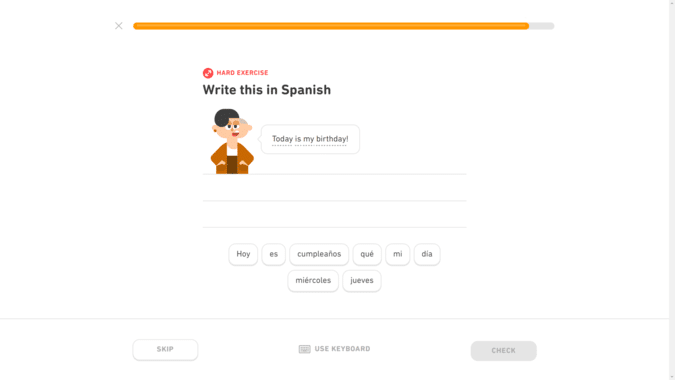
Okay, we need to talk about Duolingo. It’s free, it’s popular, and millions of people use it. But here’s what I’ve learned after extensive testing: Duolingo is not a good choice for beginners who are serious about actually learning a language. Let me explain why I feel this way.
First, the lessons feel more like a game than actual language learning. I found myself translating bizarre sentences I’d never use in real life. I’ve encountered things like “my horses collect teeth”. Sure, it’s amusing. But I wasn’t learning practical vocabulary for travel or conversation.
Second, speaking practice is severely lacking. Yes, there are speaking exercises, but they felt basic and the voice recognition was inconsistent. I had plenty of moments where I knew I was right but got marked wrong, or vice versa. For beginners trying to build proper pronunciation habits, this is terrible.
Duolingo – Free But Poor When It Comes To Pronunciation
Third, grammar instruction is practically nonexistent. I found myself constantly Googling verb conjugation rules because the app never explained it.
The gamification is admittedly fun. You earn points, maintain streaks, compete with friends, and get prompted by that animated green owl. But I realized I was getting hooked on the game mechanics, not the actual learning. When I tested myself in real conversations, I couldn’t hold basic exchanges despite months of daily Duolingo practice.
The free version has daily usage caps and constant ads. The premium version removes some annoyances but doesn’t fix the core issues with lesson quality and speaking practice.
My take: if you’re just casually exploring a language for fun with zero expectations, fine. But if you actually want to reach conversational level or use the language for travel or work, skip Duolingo and try something more substantial like Babbel, Rosetta Stone or Pimsleur.
Pricing: Free version available (with limitations). Super Duolingo costs around $13 per month.
➡ How long does it take to learn a language with Duolingo? Click here
Best for Visual Learners: Rosetta Stone
Rosetta Stone is one of the most established language apps, having been around for 25+ years. At the same time, their new version Rosetta Stone Sapphire, uses the latest tech, with a redesigned interface, progress tracking, and a sleek modern look. Their approach is unique: you learn by matching images to words and phrases, with almost no English explanations.
Here’s how it works: you see pictures paired with words and phrases in your target language. You match them up, complete pattern recognition exercises, and gradually build vocabulary and grammar intuition without explicit instruction.
Rosetta Stone Russian Learning Units
Rosetta Stone forces you to think in your target language from day one. You’re not constantly translating in your head. The image-based exercises work well for visual learners who pick things up by seeing and recognizing patterns.
On the other hand, the lessons became repetitive. I found myself doing variations of the same matching exercises over and over. The speech recognition technology is actually really solid. I found it more accurate than most competitors, giving me good feedback on pronunciation at the syllable level.
I also liked all the extra resources Rosetta Stone provides, like on-demand videos about local culture and live classes for an additional fee. The new Sapphire Studio also gives you access to AI tools. You can write a work email, generate unique flashcard sets and drills on any topic you want, and use Chat Missions to have mock conversations about everyday scenarios.
Rosetta Stone works best for visual learnerswho like figuring things out through context. If you get easily frustrated when answers aren’t immediately available, this isn’t your best fit.
Pricing:Around $20 per month retail for either the 3-month or 12-month plan. However the 12-month is usually on sale for around $11 per month. Their Lifetime subscription is around $400 retail but often discounted to about $200. Also offers a 3-day free trial.
Best Budget Option (Value Pick): Mondly
Mondly is my budget-friendly recommendation that still delivers solid results for beginners. It’s cheaper than most competitors while offering short, engaging lessons that gamify the learning experience.
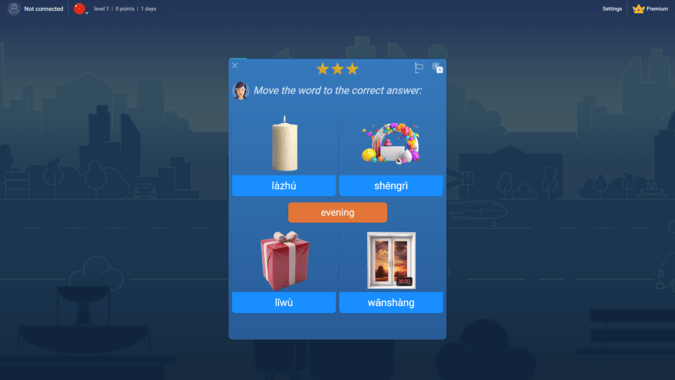
The program is structured around themed topics (weather, travel, family, etc.) displayed as landmarks on an interactive map. Within each topic, I completed 6-8 quick lessons using a variety of drills: matching phrases to images, translating sentences, completing mock conversations, pronunciation practice, and listening exercises.
Lessons are fast, typically 5-15 minutes. The interface is sleek and fun with gamification that actually works. Plus their standout feature is a VR app (separate $5 purchase). It creates virtual immersion scenarios where you practice ordering food, booking flights, or shopping in simulated environments with native speakers.
What I appreciated: Mondly focuses on practical, everyday vocabulary. The phrases I learned were genuinely useful, not random or bizarre.
Mondly Mandarin Lesson
The downsides I noticed: grammar instruction is minimal, and lessons don’t advance much beyond basics. Mondly is great for building foundational conversational skills. But if you want to reach intermediate or advanced levels, you’ll need to supplement with other resources. The lessons also felt quite similar across beginner, intermediate, and advanced levels.
Still, for job-specific vocabulary, Mondly shines. They offer courses for marketing, customer service, and finance, which I haven’t seen in other beginner apps.
Pricing: Around $13 for a month to month plan, and $5 per month for an annual subscription. Lifetime access is often on sale for around $100.
Memrise uses spaced repetition and video clips from native speakers to teach vocabulary. The user-generated courses offer tons of niche content beyond standard lessons. It’s affordable at around $12 monthly, but light on grammar and speaking practice. Better as a supplement than standalone for beginners.
LingQ lets you transform content into interactive lessons by clicking words for definitions and building vocabulary lists. You can import your own materials or use their library. Around $8-15 monthly, but the clunky interface makes it tough for complete beginners.
My value assessment: Babbel offers the best balance of quality and affordability for beginners. Mondly is cheapest for decent quality. Lingopie is also affordable and best for entertainment value. Pimsleur costs most but delivers if you’re audio-focused.
➡ Trying to decide between Babbel, Duolingo and Rosetta Stone? Read here
What Real Users Are Saying
To validate my testing, I evaluated reviews across Trustpilot, Reddit, and app stores to see how real users experience these apps as beginners.
Babbel maintains strong ratings with users praising the structured approach. With over 29,000 reviews and a 4.4 out of 5 rating on Trustpilot, beginners consistently mention the grammar instruction as a standout. One user said, “Lesson structure and grammar explanations are great.” Common complaints include “I would like more conversational speaking practice, even unscripted.”
Pimsleur users highlight the audio-first approach for speaking development. “I love driving and talking to my app, listening to conversations and responding to questions.” The flexibility to learn while driving was often mentioned.
Duolingo has the most mixed reviews for serious learners. While the gamification keeps people engaged initially, many beginners express frustration with actual progress and the Energy System. “My main issues are that you have no choice in what you learn as you follow the units and I hate the leagues – it’s all about points, not learning.”
Lingopie receives praise for making practice entertaining. “Seriously recommend for a fun, valuable, and collaborative experience.” However, users echo my experience that it works best as a supplemental program.
Rosetta Stone users appreciate the immersive visual approach. “The pictures are a fantastic visual recognition that immediately registers in my memory.” The speech technology gets mentioned as particularly helpful.
Mondly gets positive feedback for affordability and quick lessons. “This is a quick, easy way to learn a language, and only takes a few minutes every day.” Users note it’s good for building basic vocabulary, though some want more grammar depth.
Overall, user feedback aligns closely with my testing: Babbel, Rosetta Stone and Pimsleur consistently deliver results for beginners, while Duolingo falls short despite its popularity.
My Verdict: Which Platform Should You Choose?
After testing everything, Babbel is my top pick for most beginners. It offers the best combination of structure, practical content, and balanced skill development at around $8 per month. If you want grammar instruction and a clear progression path, this is your best bet.
Pimsleur wins for audio learners focused on speaking. If you have a long commute or want to learn while driving, the conversation-based approach is unmatched. Visual learners should go with Rosetta Stone for its immersive, image-based method. On a tight budget? Mondly delivers decent quality at around $5 monthly, though grammar instruction is light.
Add Lingopie once you have basics down for entertaining practice through real TV shows. Use it alongside Babbel from the start for the best results. Skip Duolingo if you’re serious about learning. It’s free and gamified, but you get hooked on earning points, not building the real skills you need to learn as a language as a beginner.
Honestly? None of them are great. Duolingo has a free version but it’s limited and not effective for serious learning. The “free” versions of most apps are basically just trials designed to convert you to paid plans. If you’re on a tight budget, Mondly offers the best value. But expect to pay something if you want quality instruction.
Which app is best for speaking practice?
Pimsleur, hands down. The entire program is built around speaking and conversation, with 30-minute audio lessons that force you to actively participate. Babbel comes in second, while Duolingo and most other apps fall short on speaking practice.
Are paid language apps worth it?
Yes, if you’re serious about learning. We’re talking $8-15 per month for quality apps like Babbel (compare that to private tutoring at up to $100 per hour). For the convenience, structure, and flexibility, paid apps are absolutely worth the investment for beginners.
Which app gives the best free trial?
Babbel offers a 20-day money-back guarantee (not quite a free trial, but close). Pimsleur gives 7 days free. Rosetta Stone offers 3 days. Most apps provide some way to test before committing. Take advantage of these to see which learning style fits you best.
Can kids use these apps safely?
Most apps reviewed here (Babbel, Pimsleur) are safe for kids with supervision, though they’re designed for adults. Duolingo is popular with younger learners, but the gamification can be addictive. For better results, use apps specifically built for kids like Gus on the Go or Rosetta Stone Kids. These include safety features like no ads, offline modes, and protected profiles.
 Editor's Choice
 Value Pick