Test Prep Insight is reader-supported. When you buy through links on our site, we may earn an affiliate commission. Learn more
IXL Math Review
Online math platform for kids (skill-based practice across grade levels)
Let’s be honest – most kids need extra math support. As one of the most popular platforms out there, IXL Math helps millions of students with targeted problem sets by grade level and specific skills. But is it free – and is IXL a good math program for boosting student achievement? I signed up to test the program out firsthand, exploring both elementary school math and high school algebra. In this parent-tested IXL Math review, I’ll cover pricing, progress tracking, how the program works, and my honest verdict on whether it’s worth it.
Given this is a lengthy, comprehensive review, we’ve included jump-to links above for your convenience.
Video Review: Is IXL Math Worth It?
In the video above, Lara from the Test Prep Insight team gives our full IXL Math review. She covers how the program works, key features, pricing, who it’s best for, and key pros and cons so you can decide if IXL Math is worth it for your child. For more detail, be sure to continue reading our full written review below.
Quick Summary – Our Verdict
Who it’s best for: Parents seeking standards-aligned math drills with detailed analytics, whether you’re homeschooling or simply wanting curriculum-aligned reinforcement. It’s also ideal for teachers exploring supplemental math tools, plus students needing support in specific skills.
IXL Math is particularly effective for kids who need to close skill gaps, benefit from repetition, respond well to immediate feedback, or want to work ahead.
Main strengths: Comprehensive coverage from pre-K through calculus, adaptive scoring system, detailed diagnostic testing, and 4,900+ math skills organized by grade level.
Key trade-offs: The drill-heavy format is not gamified like other apps, and the scoring system can frustrate kids without parental support
Our verdict: IXL Math isn’t a standalone curriculum, but it’s excellent for reinforcement and progress tracking. IXL works best as a supplement for targeted practice, summer learning, test prep, and families wanting detailed analytics.
How IXL Math Works
IXL Math (also called IXL Maths) is an online reinforcement program for students ages 4-18 (pre-K through 12th grade) needing structured daily practice in specific skills. Kids learn by working through targeted skill exercises organized by grade level, with adaptive questions that adjust difficulty based on performance. With over 17 million students and 1 million teachers using IXL, it’s one of the most widely adopted math programs in schools and homes.
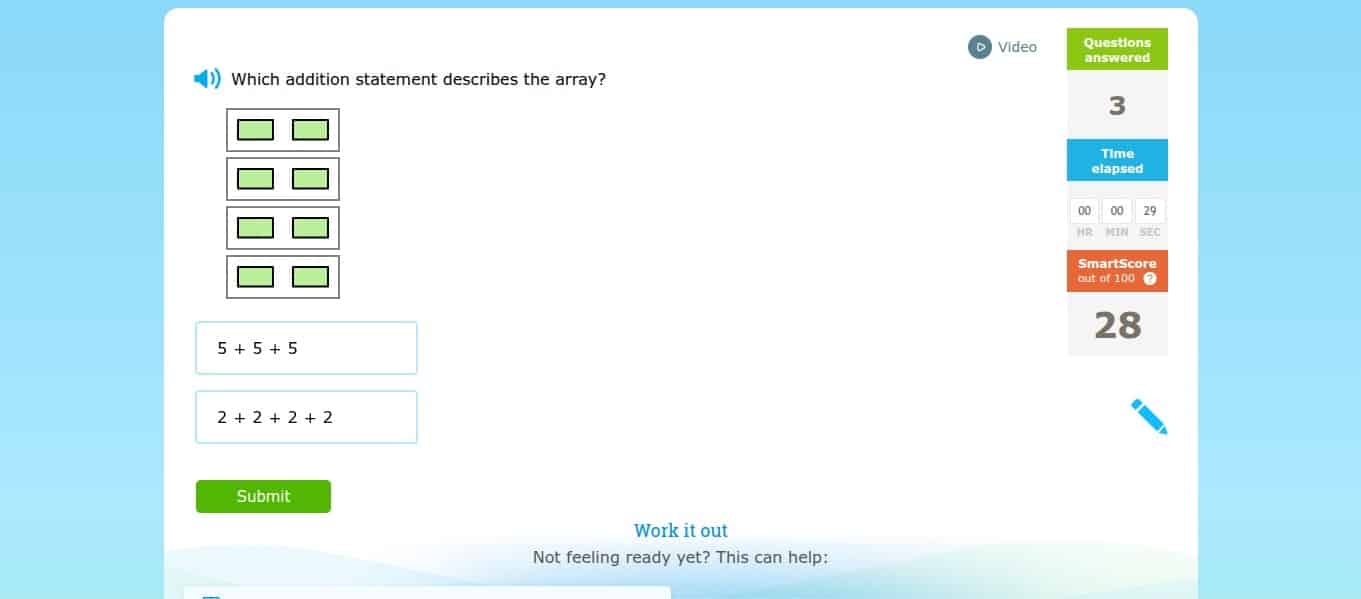
An IXL Math problem
My kids started using IXL Math as a classroom resource back in elementary school. Now that they’re in middle and high school, we maintain a family subscription for at-home practice. For this review, I also created an elementary-level profile to test out the younger grade levels. After logging in, I registered profiles and ages for each child. From there, I could either have them take a diagnostic assessment to pinpoint their exact level, or simply browse skills by grade.
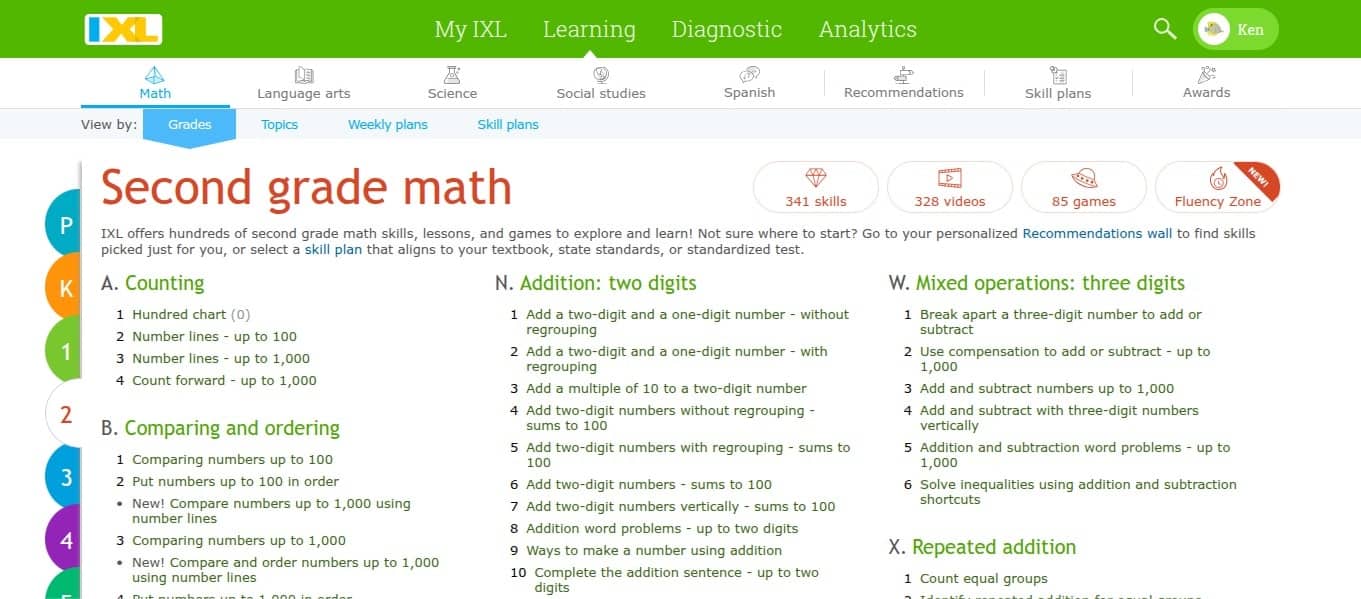
The platform then launched me into the skills interface, with hundreds of individual math topics organized by category. I was impressed by how granular the skill breakdown is – instead of just “addition,” you get specific skills like “add a two-digit and a one-digit number without regrouping.” There are some virtual prizes and certificates to boost engagement, but they’re limited – more on that later.
Learning topics by grade level
Rather than following a rigid sequence, kids (or parents) can choose which skills to focus on, though the diagnostic generates a personalized action plan with specific recommendations based on identified weak areas. This flexibility worked great for targeting kids’ trouble spots without forcing them through material they’ve already mastered.
Pricing: Subscriptions, Trials and Discounts
The IXL Math cost depends upon your subscription plan. The math program costs about $10 per month for one child, or you can save by paying about $80 per year. The Combo Package (math plus language arts) costs about $16 per month, while the Core Subjects Plan (math, language arts, science, and social studies) is just under $20 monthly.
Each additional child costs an extra $4/month or $40/year, making IXL a good value for families with multiple children. Instead of offering an IXL Math free trial, they let you cancel within 30 days of subscribing and request a full refund if you’re not satisfied. You can also take advantage of their 10 free daily questions. It’s definitely not enough for making real learning gains, but it does give you a quick feel for how the program works.
You can cancel anytime through account settings. You’ll still have access through the end of your billing period.
Free
Paid Subscription
Practice questions
10 questions per subject per day
Unlimited questions
Progress tracking
Bare bones, very limited parent dashboard; no other progress tracking available
Full diagnostic test with action plan; adaptive Smartscore system; full parent dashboard with detailed analytics and reports
Virtual awards
Not available
Full awards and certificates
Multiple children
One profile
Add for $4/month each
What You Actually Get: Skills, Questions, and Practice Format
As a teacher, this is what I love about IXL Math: the skill-specific practice sets, instant feedback, and adaptive scoring show you whether a student has actually mastered any particular skill. Other apps might throw some math activities at students here and there, but IXL’s dynamic system assesses whether users truly “get it.”
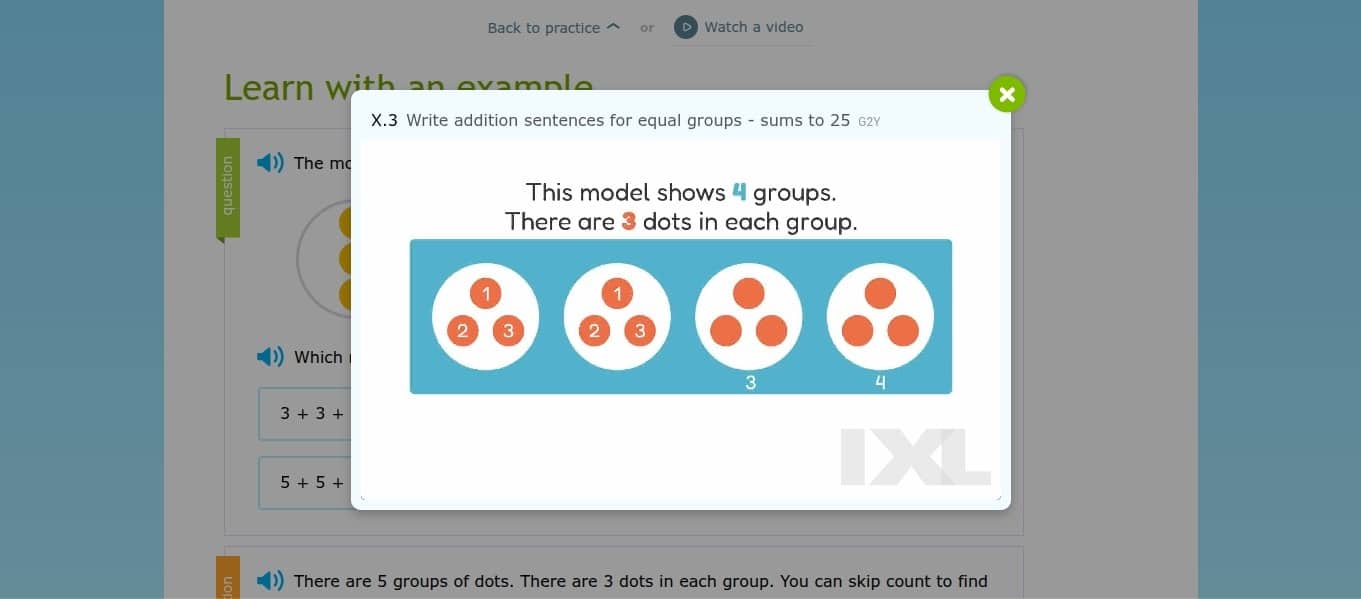
IXL instructional video
Here’s what I mean. Each grade level is broken down into about 100-400 specific topics. Instead of being locked into a sequential curriculum, you’re simply provided with recommendations based on your diagnostic test. It’s up to you whether you work through the entire set in order or jump straight to the exact concept you most want to target, like “add and subtract numbers up to 100” or “create line plots.”
Each session takes about 10-20 minutes to work through. When you click on a skill, a question pops up. This surprised me at first; I’d expected to start with an introductory lesson! The key is understanding that IXL isn’t instruction; it’s a practice tool for reinforcing the official instruction students already see in school. At any point, learners can review a written example, watch a 2-5 minute instructional video for a quick refresher, or backtrack to a more foundational skill as necessary.
Instead of assigning learners a percentage score at the end of a learning activity, their SmartScore system starts users at 0 for each activity and has them earn their way up towards 100 as they answer questions correctly. Immediate feedback follows each question, with a brief explanation for incorrect answers. As students begin scoring correctly, the question difficulty increases.
In my classroom, I observed the problem with traditional scoring methods: without immediate feedback, students repeat the same mistakes over and over, and often shrug off a score they receive the next day, when it no longer means anything to them. IXL’s live scoring, on the other hand, pushes kids to actually learn from their mistakes and correct them in real time. There’s no option for accepting a bad score and moving on; kids aren’t done with a topic until they’re consistently getting those answers right.
While the adaptive system is excellent for evaluating true mastery, I will say that it can be a little frustrating for students who fixate on scores. Within IXL, a score of 80+ indicates proficiency, 90+ is considered excellent, and a complete 100 is required to demonstrate mastery. Those last 20 points are hard to come by; the score climbs faster initially but slows down as questions become more challenging, and one mistake can cause a significant score drop right when students are nearing 100. In my experience, I find it reduces the pressure to tell students you’ll add 10 points to their IXL score or simply do the last 10 questions together.
Grade Coverage and Curriculum Alignment
IXL provides comprehensive grade-by-grade coverage from pre-K through calculus. The program literally spans simple numbers and counting for three- and four-year-olds all the way to high school algebra, geometry, trigonometry, and calculus. IXL aligns with Common Core State Standards and all 50 state standards, making progress tracking easy.
Grade Level
Key Topics
Typical Age
Pre-K and Kindergarten
Counting to 20, shapes, patterns, basic addition
3-6
Grades 1-2
Addition/subtraction, place value, two-digit operations, fractions
6-8
Grades 3-4
Multiplication, division, data and graphs, multi-digit operations, decimals, area
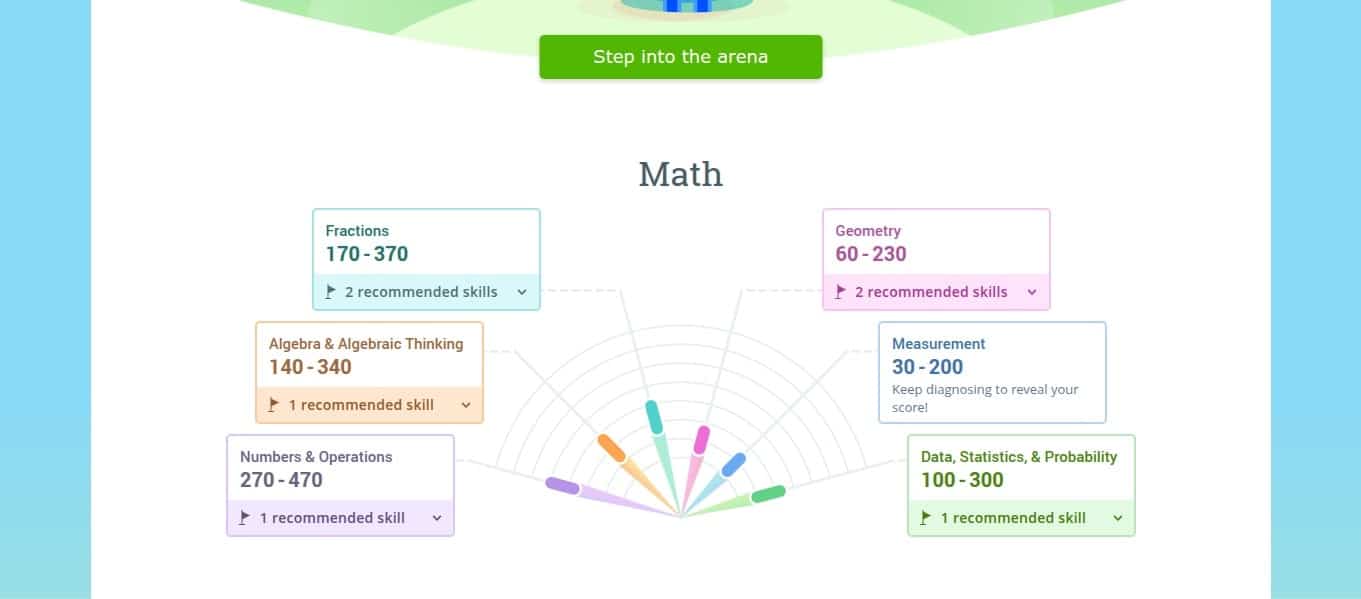
Once kids’ profiles are set up, they start by spending about 45 minutes taking the IXL Real-Time Diagnostic. Questions adapt in real time to pinpoint students’ exact ability level, topic by topic. After that, the system creates a personalized “Action Plan” spelling out the exact problem sets your child should prioritize.
IXL Math Diagnostic
What is a “good” math level on IXL?
IXL uses scores from 0-1,300 that correspond directly to grade levels:
Score of 300 = ready for IXL 3rd grade math
Score of 350 = 50% through 3rd grade
Score of 400 = ready for IXL 4th grade math
Score of 700 = ready for IXL 7th grade math
*Not all scores listed above.
Math breaks into specific strands (Numbers and Operations, Algebra, Geometry, Data/Statistics) with individual scores showing exactly where kids excel or struggle.
IXL Math Diagnostic levels
IXL then generates personalized skill recommendations, eliminating guesswork. The action plan updates continuously as students answer 10-15 weekly diagnostic questions, keeping kids appropriately challenged.
Progress Tracking and Parent Controls
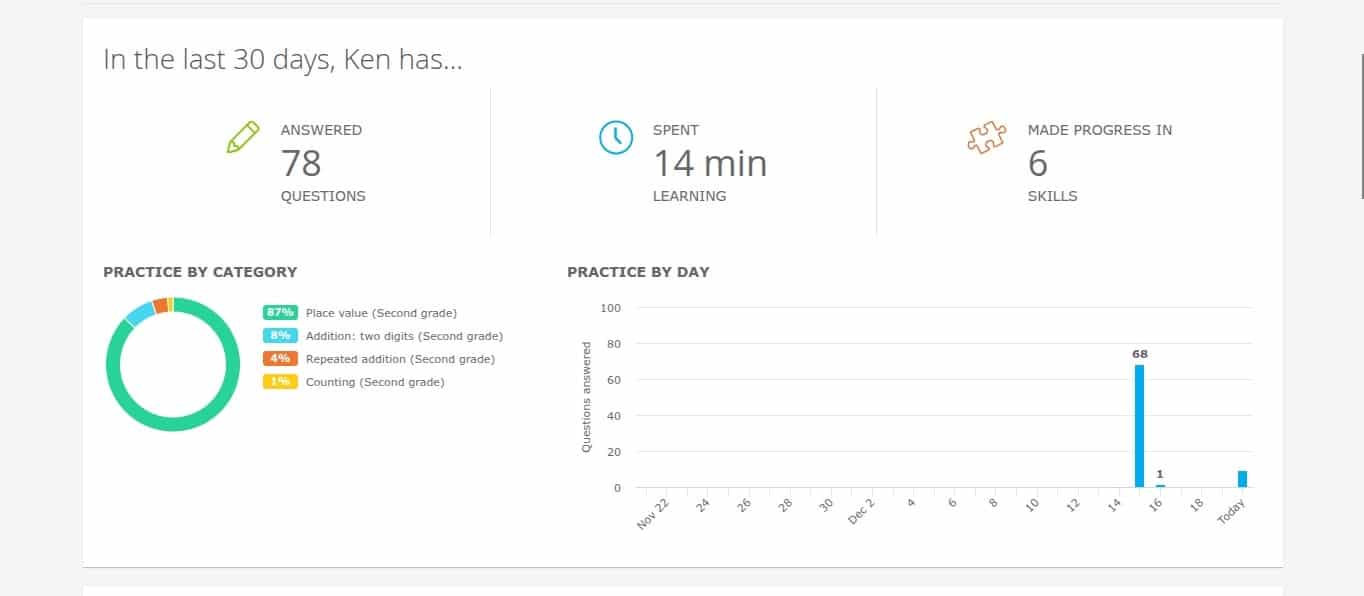
Honestly, IXL’s analytics dashboard is one of the best I’ve used. The parent dashboard shows total questions answered, time spent, skills worked on, SmartScore progress, and current diagnostic levels. Everything is easy to browse at a glance, or you can go deeper to review every question your child missed. Best of all, it’s not on you to remember to log in and check on how your child is doing. Automated weekly updates sent straight to your inbox take one more task off your plate while ensuring that your kids’ progress stays on your radar.
IXL Math progress tracking
Detailed reports include:
Trouble Spots: Flags skills where students struggle
Scores: Shows skill-by-skill performance, mastery, and growth over time
Questions: Review which answer your child gave for any question
The parent dashboard also allows you to recommend specific skills for your child to work on. Teachers get additional features for roster management, skill-based assignments, class-wide reports, and parent communication.
Engagement and Motivation
The recent addition of 400+ IXL math games for pre-K through 5th grade gives children a break from routine questions for more interactive learning. IXL second grade math games include Pacman-style addition drills, while IXL 5th grade math has students make silly recipes while practicing measurements and conversions. These games are simply a bonus feature, however – not the main way kids engage.
IXL math game
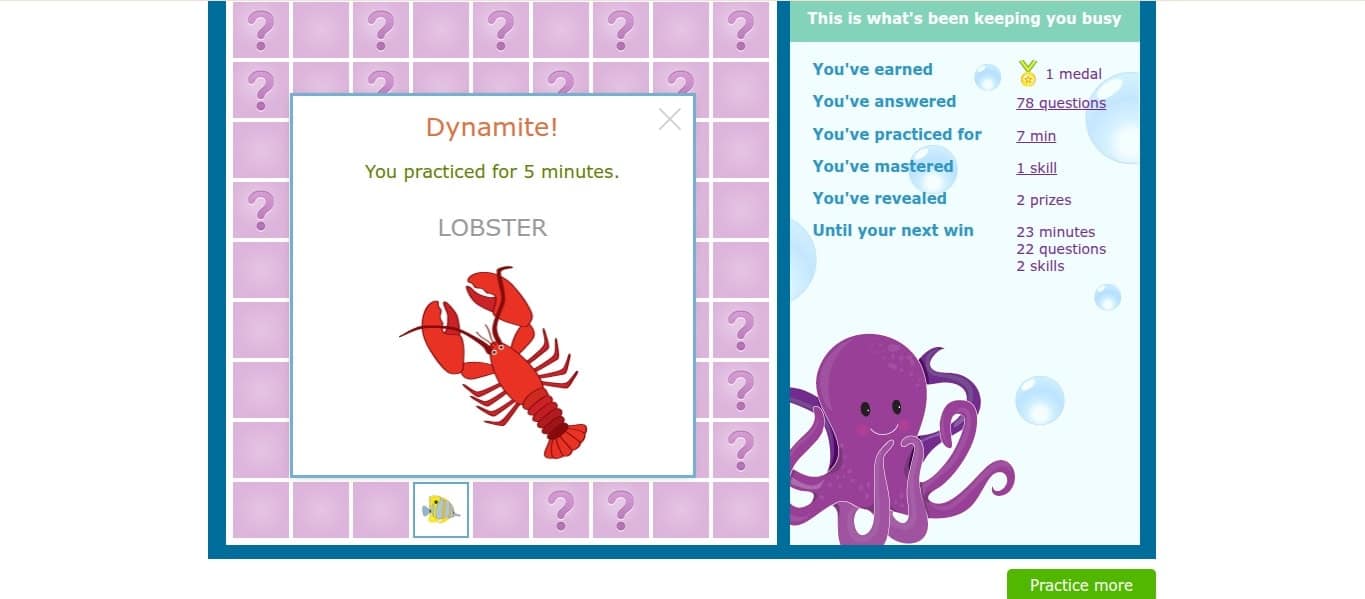
Overall, IXL isn’t a totally gamified app like other programs. High scores unlock awards and hidden prizes, like a fish they can use as their profile icon. Still, there are no avatars to dress up or fantasy storylines – it’s straightforward practice with rewards layered on top. The focus here is on developing genuine math skills and tracking concrete progress, not keeping kids entertained with flashy games.
An IXL Math prize
My advice on how to keep kids motivated:
Short sessions: Only requiring 15-20 minutes daily helps prevent burnout
Choice within structure: Let kids choose from recommended skills
Celebrate milestones: Make a big deal of skill improvements
Parent involvement: Sit nearby to provide encouragement and assistance learn kids get stuck
Bottom line: IXL is no-nonsense skill practice. It’s been effective with my own kids precisely because it’s focused and gets straight to the point.
Pros and Cons
Here’s what works well about IXL Math:
Targeted skill practice lets you zero in on the precise topics where kids truly need the help.
The huge breadth of grade levels and math topics means one subscription works for all ages.
Strong tracking tools including the diagnostic assessment, SmartScore system, and detailed reports provide clear data.
The immediate feedback and mastery-based scoring makes IXL good for systematically closing gaps.
The program is aligned with the Common Core and state standards, making it a perfect tie-in to classroom work.
Still, there are a few areas where IXL could improve:
The simple question-based approach can feel repetitive, losing kids’ interest after a certain amount of time.
The straightforward approach is less game-like than some other math apps.
Many kids find the scoring system frustrating without support or encouragement.
IXL Math vs Free Apps and Other Paid Programs
One completely free alternative is Khan Academy, which offers video lessons, exercises, and progress tracking for kindergarten through college. There’s no diagnostic testing, however, and IXL breaks topics down into granular skills so you can zero in on exact trouble spots. Consider using Khan Academy as a video resource for learning new concepts, along with IXL for more intensive practice, diagnostic data, and skill mastery.
Prodigy Math embeds math activities within a fantasy role-playing game, with free and premium options available. It works as a fun math supplement, but the lack of detailed analytics makes IXL better at assessing and improving kids’ skills on a topic-by-topic basis.
IXL Math
Khan Academy
Prodigy Math
Cost
$10/mo
Free
Free (premium plans cost $10-20/mo)
Grade coverage
Pre-K through Calculus
K through College
Grades 1-8
Educational approach
Skills-based practice questions with detailed diagnostic testing
IXL works across virtually every device. The mobile app works smoothly on both iOS and Android, though the parent dashboard is easier to access via computer browsers.
IXL is kidSAFE COPPA certified, so there’s no third-party advertising, chat features, or social elements. Information stays private, and you control access to your own data. Note that IXL requires internet connectivity with no offline mode.
Final Verdict – Should You Choose IXL Math?
Time for the verdict: is IXL Math worth it? Yes – as long as you understand what it’s for. This is a collection of straightforward and highly effective drills, not a gamified app.
But if you’re looking for extra practice in math, IXL is hard to beat. The diagnostic testing accurately pinpoints exactly where your child stands, and the action plan takes all the guesswork out of what to work on next. I also love how the comprehensive grade coverage means you won’t outgrow the platform as kids advance. The biggest win for me was seeing my daughter’s diagnostic score significantly jump in her weak areas after just two weeks. That kind of measurable progress alone made the subscription worth it.
Bottom line: there aren’t many tools out there that focus this intensely on mastering specific math skills. IXL delivers documented progress for homeschoolers and targeted support for any student who needs extra help.
👉Click here to learn more about another leading kids education app, ABCmouse
FAQ
How much does IXL math cost, and is there a free trial?
IXL costs about $10 per month or about $80 per year for a single-subject subscription, with additional children costing $4 per month. Unfortunately, there’s no free trial, but you can try 10 free practice questions per day to test the platform before subscribing.
What grades is IXL Math best for?
IXL Math works for all grades from pre-K through 12th grade. Any students who need structured skill practice can benefit from the adaptive question format.
What is a good IXL Math diagnostic score?
A good diagnostic score is one that falls within your child’s current grade level range. A 4th grader scoring 400-500 is right on track, while anything significantly below their grade indicates gaps that need attention.
Is IXL Math good for homeschool?
Yes, IXL is great for homeschool families who want structured support aligned to grade expectations. Just keep in mind that it’s a math supplement for additional reinforcement – not a full curriculum.
How do I cancel IXL?
You can cancel IXL anytime by logging into the parent dashboard. You’ll keep access through the end of your current billing period, and there are no cancellation fees or complicated processes.